Hello! What do you need help with?
Tap one button. One thing to do per screen, with a picture and a check.
One-page paper handout
The three quick fixes, the remote buttons, popular channels and phone numbers, with a QR code to this page. Letter size, prints on one page.
Before you set up the TV box, have these ready
- Wi-Fi name and password (on the Ting installer's card, or the bottom of the white eero box)
- Your DIRECTV welcome email with the temporary username and password (sent to the email the Village has for you; check spam)
- A Google account, only if you want the voice button (optional)
My TV (saved on this phone or tablet)
This lets the guide show the right steps. Nothing is sent anywhere.
The HDMI plug my box is in:
My TV brand:
My favorite channels
Tap the heart on the channels you watch. Then print a card for your fridge or coffee table.
The Village plan includes 90+ live channels and local stations, a cloud DVR (press the red dot button to record), and the Max and Paramount+ with Showtime apps at no extra cost: press HOME, then Apps.
Channel numbers are the standard DIRECTV numbers. If a number does not match your Guide, say the channel name into the remote instead.
Save favorites on the DIRECTV box
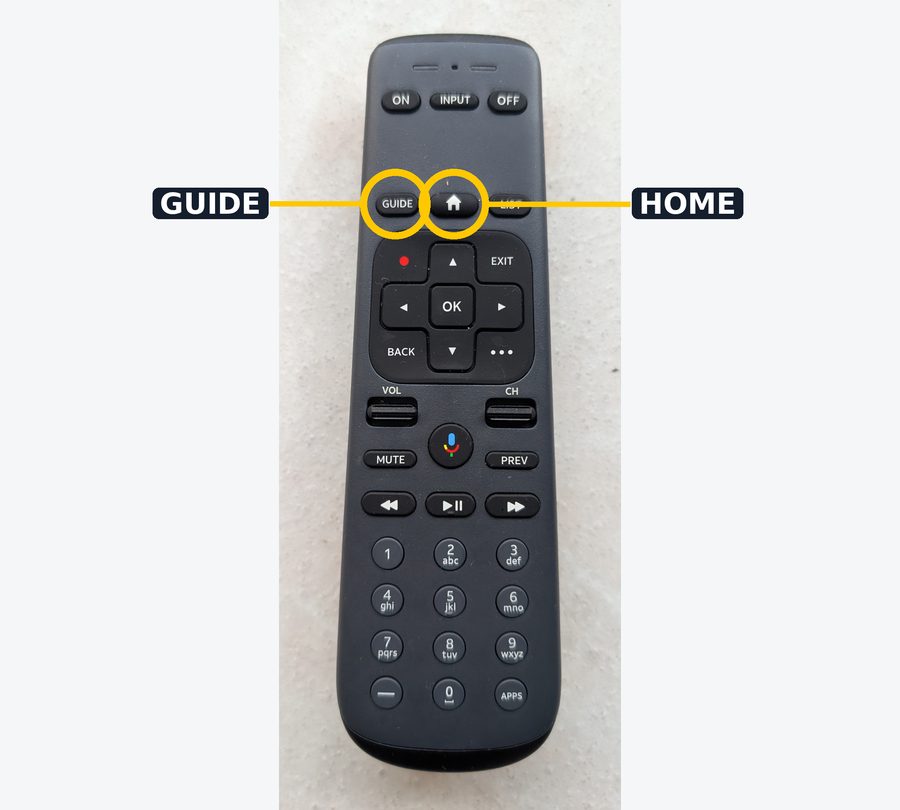
- Press GUIDE on the DIRECTV remote.
- Move to the channel you want with the arrow buttons.
- Select the heart next to the channel. The heart fills in when it is saved.
- To see only your saved channels: open the Guide and choose Favorite Channels.
- To remove one, select the heart again.
Channels in other languages
The Village's basic DIRECTV plan has 90+ channels in English. For Spanish, Chinese, Vietnamese, Tagalog, Korean, Italian, Portuguese and others there are three ways.
Way 1: Add a DIRECTV language package (monthly fee)
The channels then appear in your normal GUIDE with channel numbers, and you can heart them as favorites. Prices and channel lists come from DIRECTV, so ask before you order.
- Spanish: Optimo Mas, Espanol, Deportes (Univision, Telemundo, Fox Deportes and more)
- Asian: Korean, Vietnamese, Tagalog, Mandarin, Cantonese
- European: Italian, Portuguese and Brazilian, others
Say: "I am a Laguna Woods Village resident. I want to add the [Spanish / Chinese / ...] package." Family or the Mac Lab can help with the call.
Way 2: Install a free or low-cost app on the box
The DIRECTV box can install apps from the Google Play Store. You need a Google account signed in on the box.
- Press HOME, go to Apps, open Google Play Store.
- Hold the microphone button and say the app name, or type it.
- Choose Install, then Open. Next time it is in your Apps row.
- Spanish: ViX, Univision NOW, Telemundo, Sling Latino
- Chinese and Asian: Rakuten Viki, iQIYI, TVBAnywhere, YouTube
- Korean: KOCOWA, OnDemandKorea, KBS World
- World news: NHK WORLD-JAPAN, France 24, DW (Deutsche Welle), YouTube
Way 3: Send it from your phone to the TV
If a channel is only on your phone or tablet, play it there, tap the cast symbol (a small screen with waves), and choose the DIRECTV box. Phone and box must be on the same home Wi-Fi.
Who to call
Resident Services does not handle Ting or DIRECTV problems. Call the company directly.
Ting internet (the white eero Wi-Fi box, no internet)
Ting support: 844-846-4994Install appointment, reschedule: 714-263-1826 (calls and texts from this number are Ting).
DIRECTV (the TV box, remote, channels)
DIRECTV: 866-258-8766Online: linktr.ee/LagunaWoodsVillage
In-person help in the Village
Mac Lab, Community Center 3rd floor, 24351 El Toro Road. Monday to Wednesday, 9 am to noon and 1 to 3 pm. Hands-on help setting up DIRECTV equipment.
PC Club Ting pages: thepcclub.org/ting-fiber-rollout-new
Ting Village page: internet.ting.com/ting-lagunawoodsvillage
Village Television videos about the Ting install: YouTube: Village Television
Hire a helper (R.I.S.E.) and learn your remote
Independent helpers who come to your home for Ting and DIRECTV, $45 for 30 minutes or $60 for 1 hour (2026), plus a guide to every button on the DIRECTV remote.
Helpers and remote guideThis helper page
LWVlife: [email protected] or (562) 888-0099